Homepage

Mostrando las entradas con la etiqueta google. Mostrar todas las entradas

jueves, 21 de julio de 2016

Send Email with ESP8266 (Google Docs) Google Script App +Google Spreadsheets + Gmail


Reusing the connection is established with google  cript app google and  google spreadsheets, they have conducted tests of electronic mail sent availing the services of google.


In this case the ESP8266 sends a series of parameters to google Script Email Address, Subject, Message via the url,
  operation is both simple and I think that is simply an option to send any eventuality from your gmail account without much complication.
Simply a secure connection with Google script is done and sends a Post with the parameters required

  There is another way to send e-mails and tutorials future roadmap send emails via SMTP native from ESP8266.
SMTP from Wikipedia.

Important note :
To understand in detail the mode of operation of the connection between esp8266 and Google App Script first see the following posts, since the Library uses HTTPSRedirect created by Sujay Phadke (electronicsguy) thanks for their contribution to the community ESP,

1. ESP8266 program with Arduino IDE in 5 minutes

2. ESP8266 direct connection to Google Spreadsheets (Google Docs)

Informative note :
It should be noted that these services must have a gmail daily limit, both email and Script execution, this note is purely informative.

Informative Dashboard for Google accounts.

https://www.google.com/settings/dashboard?hl=es-419
http://www.google.com/appsstatus#hl=es&v=status

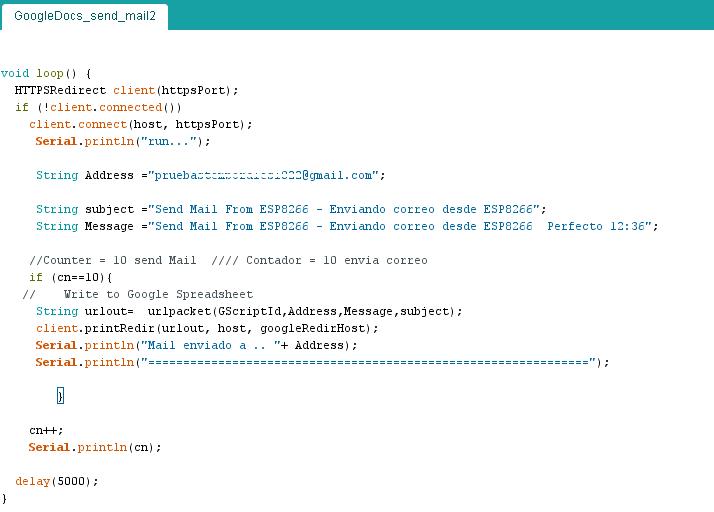
Arduino IDE Code
download code at the end of post
Code Google Script App
Make reading parameters from ESP8266 and makes sending email.
download code at the end of post


Google Spreadsheets 
Template Verification, Google script reads cells A2, B2, C2 and D2 There must come from ESP8266 parameters.


Terminal Serial  ESP8266
Initially, the module makes connection to the network, performs verification certificate, Send POST data.
It has created a counter to prevent uncontrolled mails sent when the counter is equal to 10 can make the shipment.


Mail from Receiver
Currently I have only tested emails to gmail, but should work to any mail server.


Video Complete Test


More Test Similar

Test Prueba 01-  ESP8266 + DS18B20 Onewire + Google Speadsheets (Google Docs)


Connection PLC fpx Panasonic and Google spreadsheets (Google docs) 


Control outputs  ESP8266  with Google spreadsheets (Google docs) Direct


Downloads

Related Projects

More Info:

Youtube Channel
PDAControl


miércoles, 6 de julio de 2016

Test ESP8266 + DS18B20 Onewire + Google Speadsheets (Google Docs)


If we want a simple solution to monitor temperature, for complicate applications?
if we have Google Docs, This test perform temperature measurement using a probe DS18B20 and transmit directly to  Google spreadsheets using as Google app script bridge.
For this test approximately every 10 seconds temperature data was sent.

Requirements
Arduino IDE
Programming ESP8266
Google Docs account


Connection ESP8266 and Google spreadsheet (Google Docs) Direct
I tested the bookstore Library HTTPSRedirect created by Sujay hadke (electronicsguy) thanks for their contribution to the ESP community, in your example creates a kind of chat between Google Docs and ESP8266, below a tutorial video where settings are explained and Connection.


Important note:
To perform this test is required to see the previous tutorial, settings for Google script and Google spreadsheets, Below are the sofware related to this project.

probe DS18B20


Google Spreadsheets Sheet

This sheet has the following characteristics:

1. Historical Record
2. Graph Historical
3. Dial for Current Status


Video Tutorial
Materials

1  - 1 ESP8266 - 01
2  - 2 Converter FTDI  Serial -Usb ttl
3  - 3 Regulator 5 a 3.3v
4  - 1 Sensor DS18B20


Downloads  Github  Project

Related

More Info:

Youtube Channel
PDAControl


lunes, 27 de junio de 2016

Control outputs ESP8266 with Google spreadsheets (Google docs)


How many times have looked like lighting a led from the Internet, not a local network from the Internet, there is a very useful way to light a GPIO ESP8266 from Google Spreadsheets,, but first must see this complete tutorial ESP8266 direct connection to Google Spreadsheets (Google Docs).


Programming ESP8266 with Arduino IDE in 5 minutes
To make this example must know and program the Arduino IDE ESP8266-01 below a tutorial


Connection ESP8266 and Google spreadsheet (Google Docs) Direct
I tested the bookstore Library HTTPSRedirect created by Sujay hadke (electronicsguy) thanks for their contribution to the ESP community, in your example creates a kind of chat between Google Docs and ESP8266, below a tutorial video where settings are explained and Connection.


Control outputs  ESP8266  with Google spreadsheets (Google docs) Direct

I have made changes to the library so you can control the GPIO 2 of our ESP8266, writing on or off, the ESP is constantly done reading cell A2.
Modifications
Temporary change in library HTTPS Redirect.ccp to turn GPIO2, receiving the socket "On \ r"or "Off \ r".
IMPORTANT NOTE: For this example must download the modified libraries, link down on downloads.


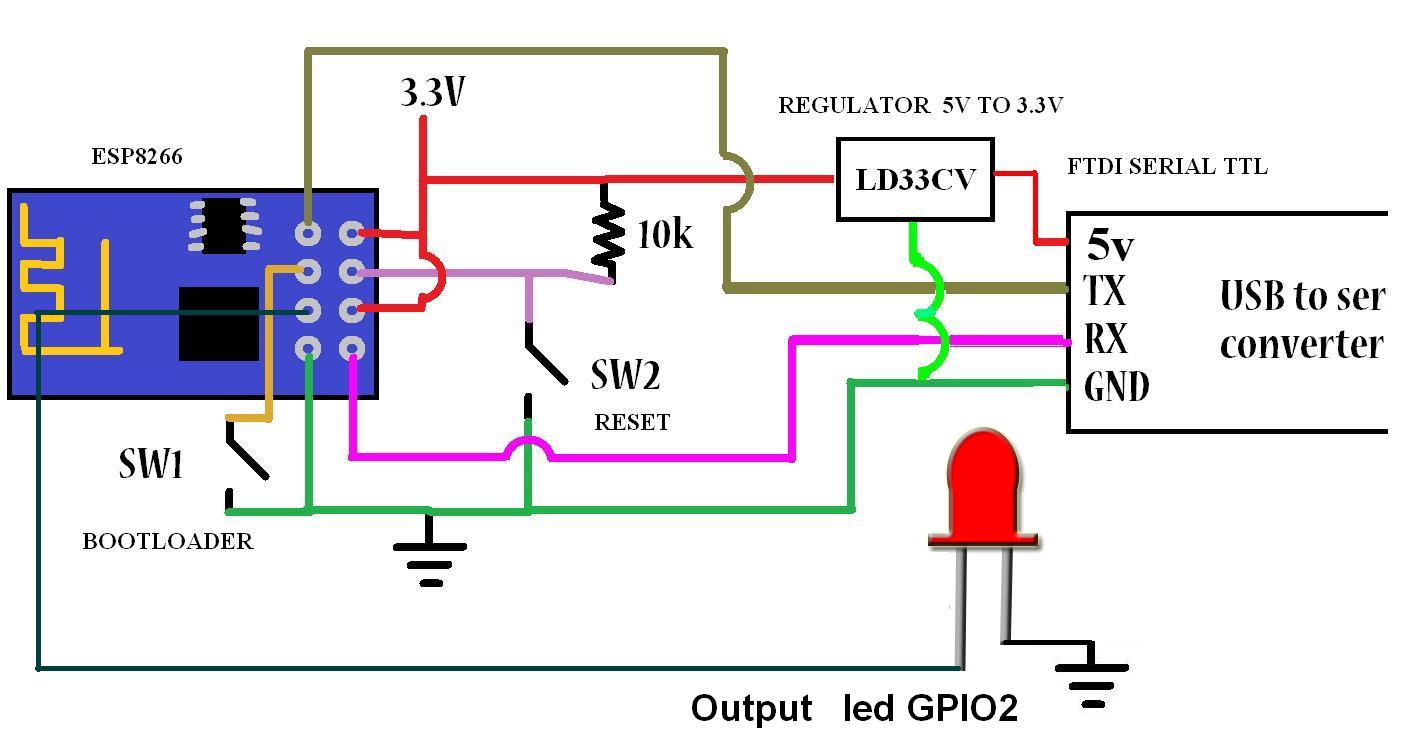
Test Circuit

Materials

1  - 1 ESP8266 - 01
2  - 2 Converter FTDI  Serial -Usb ttl
3  - 3 Regulator 5 a 3.3v
4  - 1 diode led


Downloads  Github  Project

Related

More Info:

Youtube Channel
PDAControl


lunes, 20 de junio de 2016

ESP8266 direct connection to Google Spreadsheets (Google Docs)


In the following step by step video tutorial will explain the connection of ESP8266 with script and google Google Spreadsheets.
HTTPSRedirect Library 
We used the Library HTTPSRedirect created by Sujay Phadke (electronicsguy) thanks for their contribution to the community ESP,
For connection the following is required:
GoogleDocs.ino (File Arduino IDE)
HTTPSRedirect (Library)
Code.gs (Google Script Archive)


Industrial Application Modbus RTU RS232 


Downloads

Related Projects

More Info:

Youtube Channel
PDAControl

PLC Connection Fpx C14 Panasonic and Google spreadsheets (Google docs) with ESP8266


You want to monitor values of a PLC, controller, OPC, HMI or SCADA that is Master Modbus RTU and write in spreadsheets from Google (Google Docs), In this case we will monitor the value of potentiometer V0 PLC from 0 to 100%:

Potentiometer V0 (0-1000 SCALE 0 -100%)


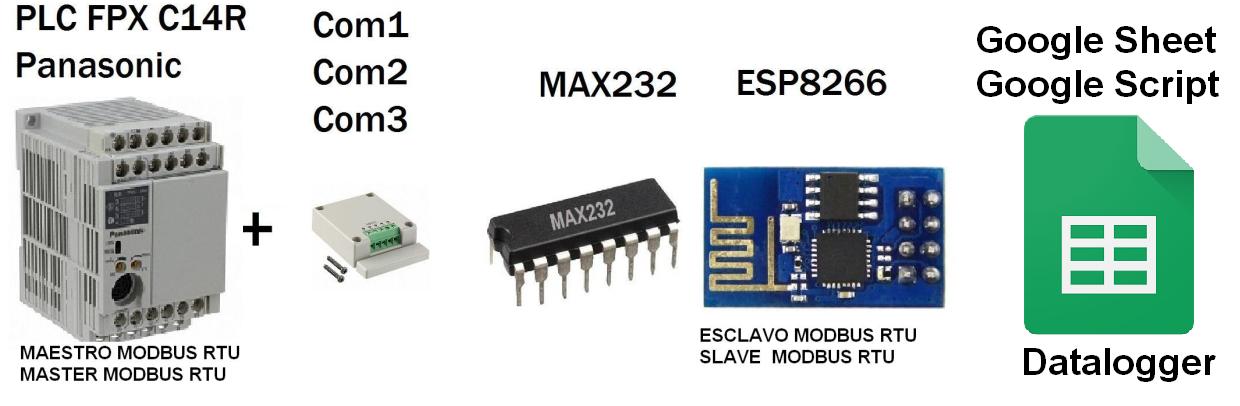
Architecture


ESP8266 Connection Script and Google - Google Spreadsheets
-01 ESP8266 connecting with Google Script and connection with the spreadsheet from Google (Google Docs) Direct.

Based on the library HTTPS Redirect for ESP8266 of electronicsguy Github I have set and have made several improvements, I created the following tutorial full to Connect ESP8266 with (Google Script) and (Google Spreadsheets)


Connection ESP8266 and Panasonic PLC via Modbus RTU (RS232)
Modbus RTU Slave ESP8266 -01 PLC Panasonic FPX C14R Master Modbus RTU (RS232),

Video Complete Test


Google  Spreadsheets


In a nutshell
ESP8266 monitors the values in Registers Holding PLC and insert them into the spreadsheet.

 MAX232 (RS232) + MAX485 (RS485) + ESP8266 - 01  


Data insertion time
Every 15 seconds minimum, to avoid saturating the ESP8266.

Materials 
1 PLC FPX C14R Panasonic
1 Cassette COM4 RS232
1 ESP8266-01
1 MAX232
1 Regulator 5v a 3.3v
1 Power supply 5v

Connections


Downloads - Complete Project

Related Projects

More Info:

Youtube Channel