Homepage

Mostrando las entradas con la etiqueta Node red PLC. Mostrar todas las entradas

sábado, 12 de noviembre de 2016

Tutorial ESP8266 Control Servo Node-RED MQTT (Mosquitto) IoT #2


This time the integration of ESP8266 and the Node-RED platform has been made integrating an actuator in this case a servo controlled by PWM with rotation from 0 to 180 degrees.
From an HMI or SCADA Web creator on Node-Red-Dashboard using as base the MQTT Protocol and pubsubclient library converting the ESP8266 into MQTT Client.


Note: To successfully complete this tutorial you must perform the following tutorials.
Previous tutorials Recommended
icstation.com
Tutorial 1 : Install Lubuntu (Ubuntu)
Tutorial 2 : Installation node red platform
Tutorial 3: Installation Node Red Dashboard
Tutorial 4: Installation Modbus TCP IP in Node Red
Tutorial 5: Installation of Mosquitto Broker MQTT in Lubuntu
Tutorial 6: Program ESP8266 con Arduino IDE
Tutorial 7: ESP8266 and Node-RED MQTT GPIO  # 1


Arduino IDE
The ESP8266 module has been configured as an MQTT client, as subscriber of the "servo" topic, the ESP8266 will receive a value from 0 to 100% and will convert it from 0 to 180 degrees for servo control via PWM by GPIO 02.


Mosquitto MQTT Broker
Previously it has been installed in a computer with lubuntu (Ubuntu) Linux, the server Broker MQTT which performs the management of messages in the network, Mosquitto has been used in this case.

Node-Red
A sequence of nodes has been created to send data from the Dashboard.


                                                          Node-RED-Dashboard
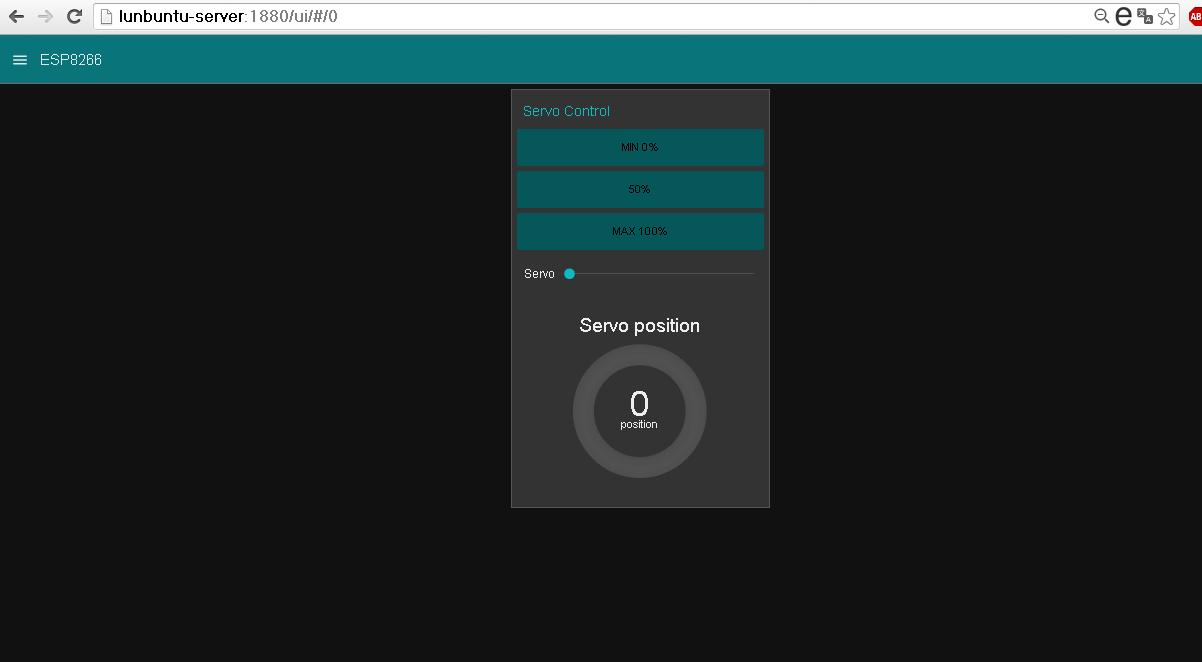
                                                            View Tablet


                            Video Tutorial ESP8266 Control Servo  MQTT Node-Red  IoT #4 
  

Materials 
1 ESP8266 01 
1 Regulator LDV33CV  5 a 3.3V
1 Chip FTDI Serial
1 Servo  Mystery control PWM

Connections

Where to buy?
icstation.com 
ESP8266 01 (ESP 01)

Downloads:
Github  Arduino IDE code ESP8266 MQTT
Github pubsubclient  Library 
Node Red  import code example

References
icstation.com
Tutorial 1 : Install Lubuntu (Ubuntu)
Tutorial 2 : Installation node red platform
Tutorial 3: Installation Node Red Dashboard
Tutorial 4: Installation Modbus TCP IP in Node Red
Tutorial 5: Installation of Mosquitto Broker MQTT in Lubuntu
Tutorial 6: Program ESP8266 con Arduino IDE
Tutorial 7: ESP8266 and Node-RED MQTT GPIO  # 1

node-red-dashboard
Nodered.org
github.com/node-red
Nodejs.org

More Information:

Youtube Channel:

miércoles, 9 de noviembre de 2016

Tutorial ESP8266 and Node-RED MQTT GPIO (Mosquitto) # 1

To integrate the module ESP8266 with node-red IoT platform has been used MQTT protocol, there are client libraries for esp8266 as MQTT in this case I decided to use the library pubsubclient.

This example will receive Node Red that receives data from the ESP8266 and allow control a LED connected to GPIO 02 from a dashboard created in Node Red Dashboard .


Arduino IDE add the pubsubclient library using the search engine libraries or manually by downloading the library and storing it in their respective folder for libraries.

Note: To successfully complete this tutorial you must perform the following tutorials.
Previous tutorials Recommended
icstation.com
Tutorial 1 : Install Lubuntu (Ubuntu)
Tutorial 2 : Installation node red platform
Tutorial 3: Installation Node Red Dashboard
Tutorial 4: Installation Modbus TCP IP in Node Red
Tutorial 5: Installation of Mosquitto Broker MQTT in Lubuntu
Tutorial 6: Program ESP8266 con Arduino IDE


Arduino IDE code
Arduino IDE code performs several steps but definire major, Broker connection with MQTT, function post (send messages) even specific topic and subscribe function (receive messages) even specific topic.
Note: At the bottom of the post code Full IDE arduino

1 .Parameters Network 
Set parameters network  PASSWORD  and SSID is required to have previously installed a MQTT Broker server which performs the function server broker, in this case I use Mosquitto MQTT.

const char* ssid = "##############";
const char* password = "###############";
const char* mqtt_server = "192.168.0.19";

2. Function publish ("topic" message)
 client.publish("event", "hello world");

3. subscribe Function ("topic")
the subscribe function makes a call to the callback function for data reception
  client.subscribe("event");

4. callback function
This function enter 3 personal parameters of the library pubsubclient.h topic, payload (load) and size, performs printing  of the topic and the message, to turn on the LED diode sweeps payload in a specific position to determine the state 1 or 0.

void callback(char* topic, byte* payload, unsigned int length) {
  Serial.print("Message arrived [");
  Serial.print(topic);
  Serial.print("] ");
  for (int i = 0; i < length; i++) {
    Serial.print((char)payload[i]);
  }
  Serial.println();

  // Switch on the LED if an 1 was received as first character
  if ((char)payload[0] == '0') {
     Serial.println("LOW");
    digitalWrite(2, LOW);   // Turn the LED on (Note that LOW is the voltage level
    // but actually the LED is on; this is because
    // it is acive low on the ESP-01)
  } 

 if ((char)payload[0] == '1') {
    Serial.println("HIGH");
    digitalWrite(2, HIGH);  // Turn the LED off by making the voltage HIGH
  }

}

Node Red
1 Node client receiving messages MQTT (subscribe) from ESP8266 through the topic "event" node debugging and debug.
2 Building 2 button "On" "Off" for sending node values MQTT (publish) to ESP8266 topic "event"
3 Node text text output to display status LED diode.
Note: At the bottom of the post code on Github Import Nodes


Design Node Red Dashboard 
Organization Tabbed Widgets and Groups


Visualization Node red Dashboard 


Conections ESP8266


Where to buy?
icstation.com 
ESP8266 01 (ESP 01)

Downloads:
Github  Arduino IDE code ESP8266 MQTT
Github pubsubclient  Library 
Node Red  import code example

References
icstation.com
Tutorial 1 : Install Lubuntu (Ubuntu)
Tutorial 2 : Installation node red platform
Tutorial 3: Installation Node Red Dashboard
Tutorial 4: Installation Modbus TCP IP in Node Red
Tutorial 5: Installation of Mosquitto Broker MQTT in Lubuntu
Tutorial 6: Program ESP8266 con Arduino IDE


node-red-dashboard
Nodered.org
github.com/node-red
Nodejs.org

More Information:

Youtube Channel: