Homepage

Mostrando las entradas con la etiqueta pac. Mostrar todas las entradas

martes, 20 de septiembre de 2016

Update ESP8266 Industrial Modbus TCP IP V2.0


There have been numerous applications in the ESP8266, I have taken as a goal to integrate this module into one of the industrial protocols most commonly used Modbus TCP IP, it would be good to have a node or sensor that sends data or a driver, OPC, PAC, PLC, HMI or SCADA.

A long time ago I found a group of people in forums.adafruit already had an advance and example have been implemented and improvements suggested by ibbba for the contribution.
The programming code for ESP8266 in this case was implemented in Arduino IDE versions 1.6.4 above. These 2 tutorials indicate connection and basic programming ESP8266 01 and 03 modules.

TUTORIAL

TUTORIAL
Previous tests library ModbusTCPSlave
ESP8266 - 01 Modbus Slave TCP IP (Ethernet) for Industrial Applications

CONCLUSIONS
In previous tests with the library Original ModbusTCPSlave, it had two drawbacks of application:
Code Execution
properly functioning communication modbus tcp, but do not run the code in the routine void loop, as a temporary solution the library for ESP8266 amending stop the connection and reconnect again, the problem with this method is time reconnection can make the teacher while accepting the data indicate error in data reception.
Serial port
Originally ESP8266 the serial port was used as a debug port in hexadecimal, I have made changes to the library so that Serial can be used freely.

                           VIDEO Update ESP8266  Industrial Modbus TCP IP   V2.0
IMPROVEMENTS
With the new modifications it has been omitted disconnection allowing a constant flow of communication if stop the connection between the ESP8266 and modbus tcp master mandatory.
Ticker
He has implemented Ticker library created and documented by igrr, it is an object to call a given function with a certain period. Each Ticker calls a function. You can have as many as you like tickers, the only memory limitation.

Important note: When creating tickers consider not create any delay would affect both modbus communication protocol, such as the execution of that function.


TESTING
the connection between the ESP8266 and a simulator configured as master Modbus tcp was made.
-initially The Ticker Parada is created.

CODE DESCRIPTION
call the function value is created and defined 2 Holding Registers:
Mb.MBHoldingRegister[0] =  Holding Registers 1
Mb.MBHoldingRegister[1] =  Holding Registers 2

Mb.MBHoldingRegister[0]  send a random(0,51) value to the Modbus Master and validate the upgrade value.

Mb.MBHoldingRegister[1]  is used for reading a value sent from the Modbus Master and from the serial terminal validate the update.

modbus routine Mb.Run();  is executed; and execute the Ticker Parada.attach_ms(25,valor); every 25ms doing the value created in the function.

Taking this example as a basis, they could perform management functions for I / O similar and digital, load and others, taking only into account not implement any delay.
POSSIBLE INDUSTRIAL APPLICATIONS


                                                                 TUTORIAL
Industrial software integration with OPTO 22

Downloads Github
Code  ESP8266_Industrial_ModbusTCP_V2

References
Arduino Mega 2560 Oled Display I2C Master Modbus RTU Scada Industrial Connection
Arduino + ESP8266 + Software Opto22 example Scada Industrial

More Info:

Youtube Channel
PDAControl


lunes, 11 de julio de 2016

Introduction to OPC Servers


The OPC (OLE for Process Control) is a communication standard in the field of control and monitoring of industrial processes, based on Microsoft technology, which provides a common interface for communication that allows individual software components to interact and share data. The OPC communication is done through a client-server architecture. The OPC server is the data source (such as a hardware device at plant level) and any OPC-based application can access that server to read / write any variable offered by the server. It is an open and flexible to the classic problem of proprietary drivers solution. Virtually all major manufacturers of control systems, instrumentation and process have included OPC in their products.

Taken from Wikipedia OPC.

In short this industry standard allows intercommunication between devices and controllers Indistriales protocols almost all brands, performed monitoring and control from HMI, SCADA, PLC and RTU PAC'S

The OPC servers contain the drivers and / or communication protocols of the vast majority of industrial controllers

The OPC clients can be created in a variety of programming languages for reading and / or writing data to the server and there to the industrial controllers.

Examples of Architecture OPC (PLC Sensors Actuators - OPC Server and Client OPC)


Iconics test server OPC UA Server


More Info:

Youtube Channel
PDAControl

viernes, 27 de mayo de 2016

Arduino + ESP8266 + Software Opto22 example Scada Industrial


Has made the integration of Arduino + ESP8266  + Software Opto22, implementing its environment scada right through IP and Modbus TCP Modbus RTU, the idea is to implement this hardware in the industry for both monitoring and control.

1- Arduino MEGA 2560 Master Modbus Potenciometer Display  Oled 
The Arduino configured as Modbus RTU master sends the value of the potentiometer to the slave in this case a slave simulator.
More info :  


2- ESP8266 Bridge  Slave Modbus TCP - Slave Modbus RTU 
ESP8266 test Registers as a bridge between Modbus RTU and Modbus TCP IP (Ethernet)
More info:


3- Arduino Mega 2560 + ESP8266  Modbus RTU Modbus TCP IP Industrial Applications
ESP8266 + Arduino Mega ready to connect to SCADA OPC PLC  Performing a mixed industrial network Modbus RTU Modbus TCP IP
More info: 


4- Installation PAC Project Basic and  Simulator PAC Sim
process software download and installation of software for Opto 22 controllers in this case download the PAC Project Basic, which includes software programming, design HMI and SCADA Runtime
More info: 


5- Download Strategy Modbus TCP IP Master in PAC Project Basic Opto22 
Opto22 example of strategy setting according to requirement as master or slave Modbus TCP, in this case for integration is configured as Modbus TCP master is discharged are configured holding registers for reading and writing respecting addressing.
More info:


Final test
Arduino ESP8266 SCADA Industrial integration on Opto 22 
This is the integration of the previous 5 tutorials
Arduino + ESP8266 + PAC Project Basic + PAC  SIM


Photos tests
Display Oled

ESP8266
Arduino Mega 2560


Materiales
1 Arduino MEGA 2560
1 ESP8266-01
1 Display Oled 128x64 I2C
1 Potenciometer 100k
1 protoboard
1 Battery 6v lead acid
1 Regulator 5 - 3.3 vdc
wires

                                                     Conections  Arduino Mega 2560
  Conections ESP8266 
Pac Display Runtime Online
SCADA HMI 

Pac Project Basic 
Programing


Downloads
Arduino IDE Code


More Info:

Channel Youtube


martes, 17 de mayo de 2016

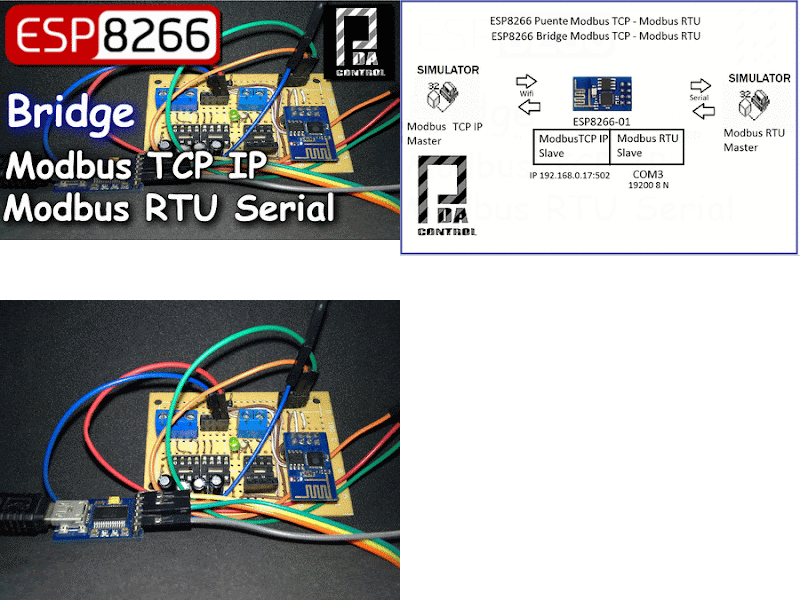
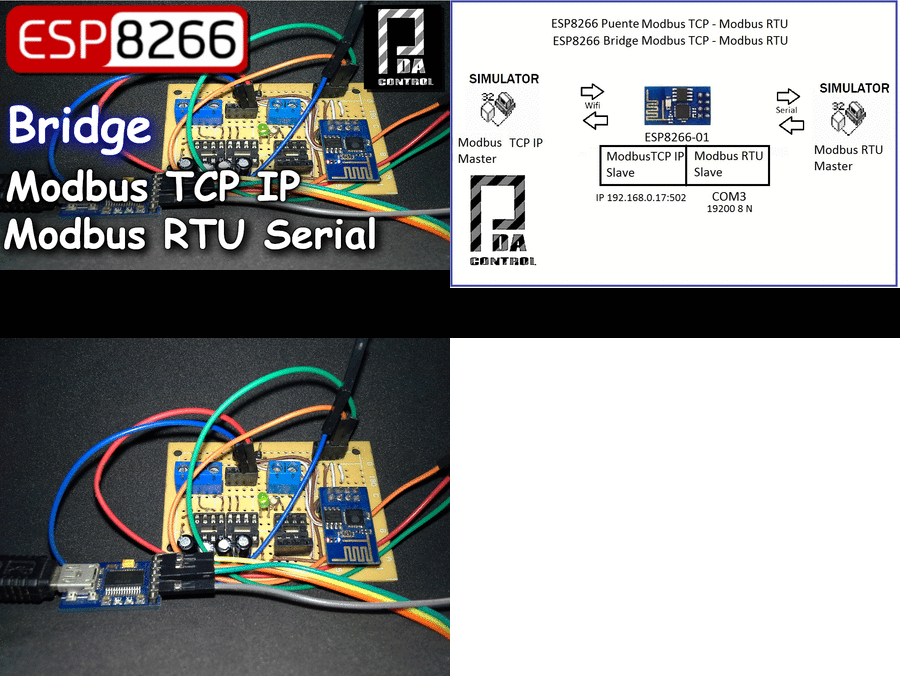
ESP8266 Mode Bridge Modbus RTU Slave - Modbus TCP IP Slave


Given previous post, this time it has been implemented ESP8266 Bridge Industrial Modbus protocol, in next tutorials will make the connection ARDUINO ESP8266 and SCADA HMI.

Arquitecture


Explaining project
ESP8266 module,
1 - It is configured by your serial port Modbus RTU Slave Serial, complementing a MAX 232 chip can convert from TTL to RS232.
2 - It is set by the wireless part - WLAN is configured as Modbus Slave TCP IP through the port 502,
3 - internally in the module 20 records both Modbus TCP IP Modbus RTU as follows redirected:


Modbus RTU -> Modbus TCP IP
From the Registry 0-9 Modbus RTU slave to the registers 0-9 Modbus TCP slave, all that is written in the first 10 records Slave RTU will be sent in the first 10 TCP Slave:

  ////  Write  Modbus TCP in Modbus RTU   10 Holding Registers
  ////  Escritura de Modbus TCP en  Registros 10  Modbus RTU  
    
  regBank.set(40001,  Mb.MBHoldingRegister[0]);   
  regBank.set(40002,  Mb.MBHoldingRegister[1]);     
  regBank.set(40003,  Mb.MBHoldingRegister[2]);   
  regBank.set(40004,  Mb.MBHoldingRegister[3]); 
  regBank.set(40005,  Mb.MBHoldingRegister[4]); 
  regBank.set(40006,  Mb.MBHoldingRegister[5]); 
  regBank.set(40007,  Mb.MBHoldingRegister[6]); 
  regBank.set(40008,  Mb.MBHoldingRegister[7]);   
  regBank.set(40009,  Mb.MBHoldingRegister[8]);     
  regBank.set(40010,  Mb.MBHoldingRegister[9]);   
Modbus TCP IP --> Modbus RTU
From the Registry 10-19 Modbus TCP slave IP to records 10-19 Modbus RTU slave, all that is written from register 10 Modbus TCP slave IP registers be sent from the RTU Slave 10.

 ////  Write Modbus RTU in Modbus TCP  10 Holding Registers
  ////  Escritura de Modbus RTU en  Registros 10  Modbus TCP  

  Mb.MBHoldingRegister[10] =  regBank.get(40011);
  Mb.MBHoldingRegister[11] =  regBank.get(40012);
  Mb.MBHoldingRegister[12] =  regBank.get(40013);
  Mb.MBHoldingRegister[13] =  regBank.get(40014);
  Mb.MBHoldingRegister[14] =  regBank.get(40015);
  Mb.MBHoldingRegister[15] =  regBank.get(40016);
  Mb.MBHoldingRegister[16] =  regBank.get(40017);
  Mb.MBHoldingRegister[17] =  regBank.get(40018);
  Mb.MBHoldingRegister[18] =  regBank.get(40019);
  Mb.MBHoldingRegister[19] =  regBank.get(40020);

Run Slaves
 
     slave.run();  /// Run  Slave Modbus RTU
     Mb.Run();     /// Run Slave  Modbus TCP
Materials
1 ESP8266
2 Converter FTDI Serial USB
3 Regulator de 5 a 3.3v for supply ESP8266

Video Test Mode Modbus Bridge ESP8266
ESP8266 Bridge  Slave Modbus TCP - Slave Modbus RTU


ESP8266 slave modbus TCP IP  Industrial Applications 


Connections


Downloads:
Part 1
Part 2 

More Info:


lunes, 16 de mayo de 2016

Download and Installation of PAC Project Basic + PAC Sim (Simulator Opto22)


Opto 22 is a manufacturing company specializing in hardware and software for industrial automation, remote monitoring, and data acquisition. The company is headquartered in Southern California and is well known in the industry automation and control of its history of innovation in the development of Ethernet relay output status and input / based systems and Controllers.
From Wikipedia Opto22.
Official page  Opto22.com .


Introduction
This tutorial will tell you how to download and install the software  PAC Project basic for creating HMI scada design and configuration generally based strategies controllers Opto22, then we will make integrations with Arduino and ESP8266 Software Opto22 .. Get ready !!.


PAC Project Basic
This software package is mainly divided into 3:
PAC Control Basic
Entrono building control strategy using 2 programming languages, traditional flowchart and similar or derived language c optoscript, also allows the creation and configuration of PID control loops, the main routines are chart or charts and allows creation Subroutines.
PAC Display Configurator
Creation Environment SCADA or HMI interaction is configured with drivers using a simbol Factory or libraries industrial simbologia (pushbuttons, actuators, pipes, pumps etc), it allows the creation of graphics and trend setting animations shift change colors etc. .
PAC Display Runtime
This application publishes and runs in real time on our HMI or Scada.
Others...
PAC Manager
Software maintenance visualuzacion of variables and more specific settings for Opto 22 controllers.
PAC Sim - simulator Opto22
Opto 22 has a equvalente simulator to have a driver Opto22 one that runs on your PC and have a time of testing and operation since it is a simulator, but in their version PAC Project Professional has SoftPac which if a controller in Software.

Video of downloading and installing PAC Project + Simulator PAC Sim  on Windows 


PAC Display Runtime visualization


With this strategy Arduino can be integrated via Modbus TCP and IP ESP8266 ..


Other tests on software and Controllers Opto 22


A look at Opto 22 controllers


Downloads:
http://opto22.com/

Future Integrations With Arduino and ESP8266 via Modbus TCP IP


More  Info: